
SUB HUNTER
page 3 of 6
Page
1 / Page 2 / Page
3 / Page
4
/ Page
5 / Page
6
 Note: This game project has finally
been finished and is now avaiable to download. Either visit the games page
Note: This game project has finally
been finished and is now avaiable to download. Either visit the games page
or download
the full game, directly from this page.
To support, Psytronik
Software,
we have included an extra demo disk, which features playable previews
of various games. Or if you wish to buy the game for your real C64 on
tape or disk, visit the Psytronik Software web site.
30th
April 2005: Level 2 - just got started
After sorting out some sub routines from last
week, I progressed on today with the second level of Sub Hunter, which
is a Sea Wolf style mode. The first thing that I done was loaded up
Relaunch 64 and I worked on with the next lot of IRQ rasters. Since the
second level does not want any scrolling, of any kind, just a
static screen. The trouble was now, that the colour settings were
slightly messed up inside the new rasters. So I decided to fix
everything.
Once the two raster splits inside IRQ were all correct. My next
task was to implement some level 2 code for the player. For level 1,
the player can move up, down, left and right and shoot weapons across
the screen to the left. However for this mode, I just want the player
to fire missiles downwards (Like in a normal Sea Wolf style of game)
and the player can only move left or right. So I programmed a little
routine to check what playing mode is being used in the game, and
called a new routine which will only allow the player control to be
changed in the Sea Wolf stage. :o)
Once I have got that routine up and running correctly, I had to get
those enemy subs moving across the screen. Well, this seems to work
quite nicely, but there is still a whole lot more work to be added on
to this level.
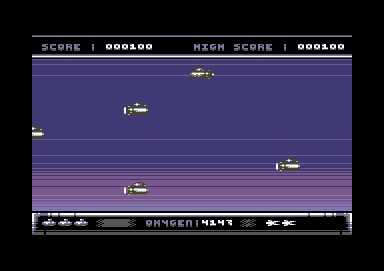
An early stage/test of level 2. Not
right there at the moment. Still that can be fixed
Yeah, I know, the past few weeks I just couldn't be asked to get
on with this game project. Erm well, I didn't feel motivated enough to
work hard on it. Well, now I am back in action, still working on level
2 for this game. Actually it is not looking all that bad to be honest
:) The sea wolf style stage seems to be working quite well. However, I
need to fix the player's depth charge. What's going on there then?
Well,
the player seems to be shooting its depth charge upwards instead of
downwards. :oD. Anyway, this should be easy enough to fix.
Now that I got the bullet to move downwards. I had come across another
problem. The first shot, the depth charge will go downwards all the
way,
but after the second shot, the depth charge gets stuck in the middle.
Now what could be the cause for this problem? Ha, I found the problem.
I used the incorrect variable value, as it was already being used by a
different variable, so I made a new variable, using a byte table. :)
The next thing for me to do is randomize the new starting positions for
the enemy subs, using a random position table. Which of course should
be easy enough. All I would need to do is create a new y position for
the enemy sub, after it leaves the screen by reading it from a data
table. :)
Well, I have been working on the enemy random y position routine. The
loops and that seem to work. but the enemies seem to overlap each other
now and then. So I'm going to have to do some tweaking to the random
position table, so that there is no overlapping of the enemies. Well, I
have sort of fixed this problem, but the random positions for the
enemies
is still crap. So I need to play around with the data tables even more
that I get a more positive result.
6th June 2006 - The Omen Strikes
Richard and tells him to get on with it!
Well, 6/6/06 eh? The omen strikes and shouts "Why is Sub Hunter
not finished when it should have been a year ago as a 2 week project".
Ahem, I just could not help making that up. Well, things have been
pretty tough the past 2 weeks, since 20th May 2006. Or should I say, I
could not have been asked to do more Sub Hunter work and did other
things, like DMC V5.0 Music Album #5, and got stuck on the Internet.
How flipping lazy eh? Nothing too exciting on the Internet at the
moment.
Yesterday I realized that there was an unanswered email, which I should
have replied to Frank. So I read carefully what he had to say and we
both come up with some ideas. The first thing was that on level 2 the
player is not supposed to drop any missile sprites. The player suppose
to drop the spinning mine sprites. So this will be my task for today.
However, another idea is that, to rescue divers. The player must drop
depth charges on to five different enemy subs. While the sea is being
invaded by deadly fish. Hmm, maybe I should introduce the snappy
crabs for this stage, rather than fish. The depth charge will be
falling
slowly and the enemy subs will go moderately fast across the screen
while those crabs are moving across the screen on a slower basis. If
the player hits a crab, maybe it can score 100 points, and double the
score for an enemy sub. Also after 5 enemy subs are hit, a diver could
swim across to the player's sub. If the player bombs a crab (As they
wont be deadly) a life will be lost.
8th June 2006 - A different idea
I had an email back from
Frank regarding the ideas. He had a new idea where after 30 seconds, if
you hit a certain amount of enemy subs, a diver can come on screen and
swims past, resulting to the diver being rescued. However, if you don't
hit enough subs within a certain amount of time, a diver comes halfway
across the screen, then an enemy sub kills it. Blood thirsty huh?
13th June 2006 - Unlucky for the subs!
Well, pushed myself to
do some more game programming. First of all, after reading Frank
Gasking's email, I agreed to changing the bullet sprite into a spinning
mine looking depth charge, which worked out nicely. It looks big and
bulky, but looks really great in the game. Next, I created the enemy
sub to bullet collision, which worked out nicely. After that I had to
add an explosion routine, which this time was put into the player
bullet's sprite. Looks quite nice and turning into a proper game. I
embedded the score routine three times, so that the player can score
more points in this round. Finally I expanded the random y-positions
for the enemy sprites after they leave the screen. There is still a bit
more work to do before this level is finished but I know for certain
the second stage is indeed 85% finished.
17th
June 2006 - Fishing Techniques
I received an email from
Frank, earlier on the week, where he suggested that I should change the
enemy subs to fish and also alter any fish sprite of my own choice for
this level. The depth charges were incorrect as well. They should have
not been the spinning mines, they really should have been a bomb type
of sprite. So I made some major corrections to this. The second thing
was to get those fish animated, which I have done. Now next thing for
me to do is to move the oxygen counter and turn it into a 30 second
clock. Well, it was quite awkward at first then afterwards I managed
it.
Pleasing results.
What do I need to do next? Well, straight forward. I need to fix up the
sprite random positions, as for some reason only three or four sprites
are on the game screen. Something, which I certainly will need to take
a
look at. My other task will be to create the diver saved intro or diver
not saved intro, for this level. But for now, I treat you to a
screen shot of what has been done today.
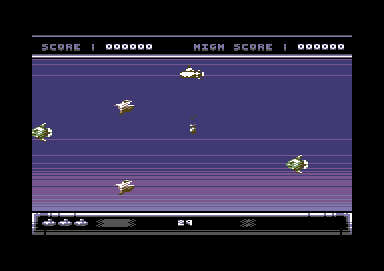
And
here it is, level 2.
I've had a reply this evening that so
far the work is looking good, however, would be cool to see the fish
bobbing up and down in form of sinus, to make things more interesting.
Secondly the enemy fish die explosion - the fish bones effect looks
cool on the fishes going to the right, but fishes going to the left,
the fish bones are the same, so maybe I will need to sacrifice one or
two sprite types to have the fish bone effect for fishes from the right
of the screen, or maybe I should use those exploding bubbles again.
6th August 2006 - Putting two levels
together for the first time
Because of the
hard work made on both levels, although level 2 is not yet finished,
but will be soon, I thought that I should combine the two levels
together and play through the game to see how well it would work out.
Well it seems to me that after adding a few more routines to put both
levels together, the game seems to be working out slightly nice in a
kind of way. I had to code routines to compare a value of the level
counter, so that both stages got linked correctly with the correct
background.
The second thing that I have done is made a couple of alterations with
level 2. There seems to be a case where the pink fish is not bobbing
correctly, due to a problem with the animation frame data table.
The alteration to the enemy fish 3 frames look quite funny, but at
least it is not bobbing in a one direction frame :oD
9th August 2006 - A bit of tweaking
with the level complete stage
No Internet access today, due to technical difficulties.
I suppose I could have used the Laptop downstairs to access Internet,
but what the heck. There's nothing to exciting for me to look at at the
moment. Probably no new news related to my hobbies on the C64, so I
asked myself "What shall I do tonight, being that I have no Internet on
my bro, Philip's PC?" Well, either muck around with the Shoot Em Up
Construction Kit, Pinball Construction kit, or do more on Sub Hunter.
Well, you don't really want me to muck around with a games creator and
create silly crap which people would loathe. Instead, I got on with the
Sub Hunter project. So then, what's happened this time?
I felt that the Level Complete phase did not look that good. So I
thought I should adjust this problem, by making the player ship
automatically move from its current position, and then make the player
move the way it should have in the first place. This is where the
player will move from where it was after rescuing the last diver, and
then the sub moves up, until it reaches another position. Then the
player's sub makes its exit by zooming across the screen to the left.
This kind of movement reminds me of when you complete a level in Blitz
2000, where the player ship slowly moves up and then fly off the
screen.
The second thing which I have done was added a routine that counts the
amount of fish being shot in level 2. This is where this part of the
game is very important. The sea wolf style stage plan is to give you 30
seconds to bomb a certain amount of deadly fish before time is up. Our
way of solving this puzzle is something like this.
IF (FISH AMOUNT = 5) THEN
DIVER SAVED = DIVER SAVED
+ 1 (MAKE DIVER MOVE ACROSS SCREEN AND LIVE)
IF DIVER SAVED = 5 THEN
LEVEL COMPLETE (DO USUAL LEVEL COMPLETE BITS)
END IF
ELSE
DIVER GETS KILLED BY A
DEADLY FISH (OOER)
END IF
Or something like that LOL!
Well, I got that to work. All I need to do now is to program the
interlude
for each part of this stage, depending on whether or not a diver is
rescued, or whether the grey fish moves across the screen and eats the
diver alive, thus punishing the player to lose one of its lives.
19th August 2006 - Finishing touches
to level 2
There were still some odd bugs in level 2 which had less fish flying
across the screen, because of the start positions. I fixed this and now
all is working fine. Once I fixed this problem of getting the two extra
fish back on to the screen, I worked on the phase complete stage. This
is where enough fish have been shot, resulting to a small interlude
where a diver swims across the screen safely and then adds a diver
saved to the indicator. Looks good. I reset the clock and everything
for the game to continue, until all 5 divers have been rescued. Then
the player zooms off screen and the level complete message appears.
After this is done, I worked on the lose a life part. Well at the
moment nothing but an explosion on the player's ship. Although it
probably would have been better if I added another interlude sequence
where the diver swims half way across the screen and a speeding baby
shark eats the diver, then the player explodes and loses a life.
27th
August 2006 - Music Maestro
New music has been created exclusively for this game by Drax/Maniacs of
Noise (Thanks Thomas). I checked out the music and I was very impressed
with it. The title music, in game tune, high score/end tune, level
complete jingle and game over jingle was really cool. I listened to all
the tunes in the JCH Music Driver, and then used the Splitter program
to relocate the tune to $8000. Once that was done, I loaded up all my
code and implemented the new music into the game project. At first I
had a crash in the game. Whoops, the music was still trying to play at
$1003, but after realizing this, I changed the JSR $1003 to JSR $8003
and all worked nicely. So now I have updated the Sub Hunter team
status!
28th
August 2006 - Level 2 is ready
What a brilliant day it has been
today for the Sub Hunter project. First of all, I noticed a couple of
the game's bugs that require a fix up. Where after the player dies,
losing a life the player can't drop a depth charge after a short delay.
That wasn't meant to happen, so I looked at the player's death code and
implemented a routine to say that the fire button has been reset. After
assembling and testing this problem, the problem had been
resolved. The second task was to kill off the two LL sprites that
had appeared on screen after level 2 was complete (Where the sub moves
off screen). All I needed to do was 'zero' the Y-position of all enemy
sprites while the player was moving off screen on level completion.
After the bug fixing was complete, I made a change to the amount of
fish that have to be killed on this level to 10. And 3 divers to save
in this round. Now I e-mail the work done so far to Frank Gasking to
have a look. Still a good result for 2 levels so far, and later on this
week I will be working on level 3 - The Lunar Lander round. Whoopee! :oD
6th September 2006 - Level 3 under
development
Well because of successfully finishing level 2, I got straight
on
to working level 3 for this game project (The lunar lander stage). I
have not really done much today as the PC keeps on crashing, but I
managed to get some work done. It is better to start something rather
than not bother doing anything at all. I added a few routines into the
game code where I can add level 3's IRQ routines to the main IRQ
routine. Selected the correct level screen graphics display, and then
displayed the screen. The colour settings looked bad, so I had to keep
playing around with the IRQs until I had what I wanted. My next task
will be to add the y positions for each sprite inside each split, which
should hopefully be easy enough :D
19th September - Raster trickery
Well I did not really do much today, but at least I got on with
the project :D. I been setting up the positions of the raster splits so
that I can display more than 8 sprites. It's done easy :)
20th September - building another
engine
After last night's
raster play. I started to code additional routines for the lunar lander
stage. First of all, I got more than 8 sprites on display, then started
to move them across the screen successfully :) Nice. Now the sprites
looked a bit wrong apart from the player. So it was time for me to
create a new enemy sprite table for the squids and the crabs. I also
set up the colours for the stage as well. I added more to the animation
routine, to set up those frames for the enemies and then test run the
program. Looks neat.
Now I had sprite animation for the enemies, it is now time for me to
start the main game body. First of all the player ship had to be
repositioned. Secondly I had to add a new routine, which put some kind
of gravity on the player's ship, so that it is gradually sinking down
to the ground. Now that is working out quite nice, although a tad on
the slow side. Maybe I should decrease the gravity delay slightly for
the player ship to be pulled to the ground slightly faster.
My next step is to create the waving man, which the player has to
rescue. I had problems here because for some reason the guy who you
should rescue, seems to be disappearing. One quick fix and he's there
no problem. Weird :) I'll just send Frank the work done so far.
To make things more interesting, take a look at the picture below :)
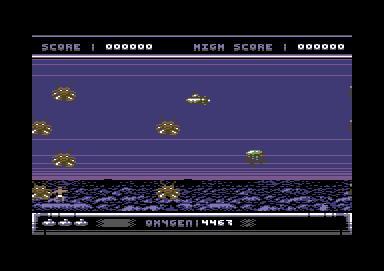
21st September 2006 - Level 3, Crashes and
Frustration
I had an email from
Frank regarding the background colour in level 3. He preferred the
colour of those purple lines to be black. So the first thing I have
done is turned those purple lines into black lines.
Most of today I have
been working on level 3 of the Sub Hunter level 3. The first thing I
done was checked what had been done so far. I had trouble with the
player to diver collision, so I had to make minor adjustments to the
code, where when the player rescues the diver and must take it to the
surface, the sub turns pink :) This is to indicate that you're carrying
a diver in the sub and that you have to go to the top of the screen. As
well as this after a player reached the surface with the diver on
board. Another one randomly drops to the bottom, and the player has to
rescue this one as well. 2 divers rescued lights up a diver in the
panel on the bottom right.
There was a flashing cursor that spoiled the game, this was mainly
because I used a poke which activated the flashing cursor by using the
poke code as a variable. Wrong move. So I fixed this problem, created a
temporary title screen and headed on to finishing the second half of
level 3.
I worked on the player/enemy collisions, which at first were bugged.
The collisions were incorrect, so I used a flashing border to check the
collision to see if it was working. It took a couple of hours of
tweaking until the sprite collisions were fixed 100%. Now I could
implement the player losing a life into the game. Once that was
done, I had to tweak the level 3 sprite display rasters, as there were
two sprites in the wrong place. They were overlapping each other.
Now that this problem was fixed I tried to add a detection routine
where the amount of lives is checked after level completion. Bad move
unfortunately because it put me into a panic. The program kept
crashing, I tried to debug the problem. I put a REM statement by the
lives detection, and come across another problem. After 2 hours of
panic and frustration I managed to pull myself together and get the
game working again. Except for that level 3's Get Ready, Well Done, and
Game Over displays funny. It is because of using fake multiplexors in
level 3's IRQ routine. I'll try to fix this tomorrow :o)) Anyway,
I saved the work and sent a new preview to Frank's Inbox.
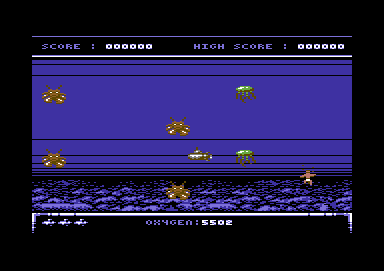
This may look like less than 8
sprites, but actually this part uses 14 sprites.
22nd September 2006 - Nothing much
I just received an email from Frank saying that so far the game
is perfect, but however he had some cool ideas for the game to make it
*** fantastic ***. His ideas are top secret. I don't want to give too
much away :D
5th October 2006 - The sinking feeling
Things have been looking great for me today. Not only did I have a good
day at work, but Level 3 has shaped up really nicely as well. I thought
I should get on with this project today because of nothing else to do,
on a cold wet evening in Solihull :o(. Anyway I had an email from Frank
a couple of weeks ago where I had to update the game engine slightly. I
disabled the up and down controls for the player. This is because
during play, the player will automatically descend to the ground and
stop (to collect the diver) and then automatically go back up again.
This is where the real challenge meets. I also tweaked the speed of the
creatures that you have to avoid during game play. The last thing I
done was fixed the IRQ problem for displaying Get Ready, Well Done and
Game Over. :)
I could say this project should hopefully be ready in time for
Christmas 2006. :) Can't promise though. But that is the date I'm
aiming to get it finished. Then 2007, to Cronosoft.
15th October 2006 - More of the
sinking feeling
I received an email from Frank that he has some ideas which would make
Level 3 look even more fantastic, so I took notice of what Frank wrote
and worked a little more on the level 3 game code.
First of all I had to code a routine which would not allow the player
to start sinking to the ground, unless the fire button is pressed.
Secondly, make the player pull down, only when the sub is going down.
Then push up, when the sub is going up. Once a diver has been rescued,
or the player loses a life, all functions are reset therefore the
player will have to press fire to release the sub again.
This level also has a more challenge. The player will not be able to
move left or right, if they pull the joystick up or down, therefore
game play is more hard, but level 3 is possible to complete :)
On to level 4.
16th October 2006 - Level 4 gets
started
I have not been very well today, so I have been taking a rest
from work at my job. Later on in the day I felt slightly better and
started working on level 4. At the moment, level 1 sprites are in level
4. But as soon as I am very well, I will be working on the main game
engine for the jelly fish attack stage. My aim for this stage is to use
a combination of a long sinus wave for each of the jellyfish that come
across the screen. Of course, the difficulty factor would have to be
more difficulty, compared to the last 3 levels. More on this update,
next time I carry on with this game project. Off to watch some demos
now :o)
26th October 2006 - Jellyfish and ice
cream (Yeah, right)
Thursday nights usually suck, so I thought I would do more Sub Hunter
work today. First of all I loaded up Sprite Pad, and calculated the
value (in C64 memory) for where the level 4 sprites are going to be
placed. Well, this time round for this level I wanted to add the purple
jellyfish and the grey sea horses. So I looked at the starting and
finishing position for each frame for the sprite. Then I worked out the
values for the enemy sprite animation. In the SUBH.ASM file, I added
some data lines to create the animation and also some pointers for
where the animation is set. Next I opened STAGE4.ASM and deleted the
Level 1 attack patterns and worked on the main attack patterns for
level 4. The enemy sprites will be moving across the screen. Hell, that
is just boring for a harder level, so I added some routines to move
those enemies up and down at two different speeds.
While testing, there was still a problem with the sprite movement. When
the enemies were going up and down, the sprite visibility seems to keep
switching off. I had to set the direction limit slightly higher for the
top position of the screen, before reversing the direction and also
vice versa. Now the level is starting to look good. However, there was
still another problem. Some of the sprites are moving up and down way
too slow. Which looked incredibly boring, so I altered the routine
slightly and the enemies are now moving up and down slightly faster
than before. Nice :o) This project is getting near to 50% completion,
but there is still a lot more work to be done before I release this
game to the public. (Where my target is Christmas day, else later on in
the New Year).
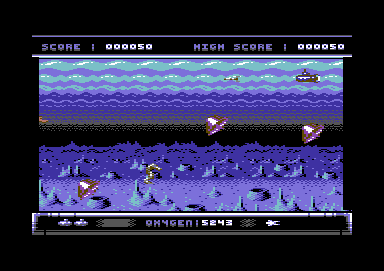
Monday
30th October 2006 - Level 4 collision and scoring
It was a cold and dark
evening, so I thought that I work more with Sub Hunter. Not a bad idea
huh? I needed to program in the player bullet to enemy sprite
collision. Which was simple enough. I tested the collision to see if it
worked, by changing the border on screen to another colour, depending
on which sprite was hit. Something like this:
Enemy sprite 1 collision = white border
Enemy sprite 2 collision = red border
Enemy sprite 3 collision = cyan border
Enemy sprite 4 collision = purple border
Enemy sprite 5 collision = green border
I tested this method and all 5 sprites' collision detection with the
bullet worked nicely. So now all I had to do is implement the explosion
animation for the enemies for after they are hit by the player and
call the score routine to give the player some more points. Well, this
has
worked nicely.
The second thing, I tried level 4 out. This particular level was too
easy to complete, so I had to do the odd bit of tweaking to make this
level hard, but of course possible to complete. The enemies now move
slightly faster, and the player has to make the correct timing to
collect enough divers for this level. Just like level 1, if a diver
gets shot, you get punished by some oxygen on the counter being took
off. Now I pass this level to Frank to check out. :o)
Tuesday 31st October 2006 - Level 4
tweaks
Nothing much, I only needed to tweak the enemy sprites, using
Sprite pad and ACME. I flipped the Jellyfish the opposite direction, as
the jellyfish looked as if they were swimming the wrong way. I also
slowed down the animation slightly too. :o))
Wednesday 8th November 2006 - Slow 'em
down
I had an email from Frank Gasking, regarding the level 4 attack
waves. His response was that level 4 was just too hard to play,
therefore I should make this level somewhat easier by slowing down the
enemy attack waves slightly. So today, despite my dreaded cold flu
virus (hopefully getting better) I did a little more on the game by
slowing the enemies x-axis down. It is simple.
The second thing is that I have discussed to Frank via email about how
level 5 (Shark attack) could work. Where I mentioned that on level 5,
the player will be facing the big shark, and will have to defeat the
evil shark to complete the level. Also the idea is to have some of the
small sharp toothed fish swimming across, to slow you down with the
shark attack. This sounds to me, pretty interesting. Hope so :o)) A
late level of the Shark Attack stage will feature 2 sharks to defeat,
and the final shark attack will feature 3 sharks to defeat. Should be
fun :o))
Saturday 11th November 2006 - Speed
'em up
Well, I received an Email from Frank, asking me to speed up the
enemies slightly. The other thing I also had to do was to add a routine
to make a swimmer die, if an enemy touches it. This is to make game
play
harder and more interesting. Frank and I also have been discussing
about how the Shark Attack stage should work. I wont tell you about it
today. Just wait until you hear about the Shark Attack stage, as soon
as I work on it (hopefully tomorrow). You will just have to wait and
see :)
Sunday 12th November 2006 - A new cave
I have been very busy this afternoon. I have got started with
level 5. It was a right pain in the ass. Before I worked on the main
IRQ routines for this level. I worked on some routines which will
scroll the chars of the cave. The cave's scroller is going to be
different compared to the previous levels. Instead of using 6 layers to
scroll 8 layers had to be used. So I typed in quite a long listing to
scroll the background rough, before I was able to implement to IRQ
smooth scroll.
Now the rough char screen scroll was working, I worked on the IRQ
multiple rasters. You'll probably understand how much I really HATE
raster coding. Especially when it comes to timing those blasted things.
Once I created the multiple IRQ rasters, I implemented the smooth
scroll variables to each raster. Now we have a nice scrolling cave.
Looks nice despite there are still some bugs in the code. Timing of
rasters always have been my worst enemy.
Monday 13th November 2006 - Level idea
Frank revealed a new idea of this Shark Attack level which can make my
coding life a whole lot easier, as I am unable to create more than 8
sprites for this level (Due to lack of raster time left in the machine
code). When he replied to me, his idea was that there can be one
player, and 3 large sharks and a baby shark (that bobs up and down like
level 1). The idea of this level will be to avoid the onslaught of
sharks within a certain amount of time. The higher the level, the more
time you have to dodge those sharks. Easier for me, and should still
give game players a whole lot of fun.
Saturday 25th November 2006 - Level 5
joys and woes and sharks
I have got started to do more of level 5. However, there is still a bug
in the IRQ raster, regarding expanded sprites positions but I shall
leave this until later on, when the main game engine has finished. The
second thing is that level 5's parallax scrolling has a bad scroll
routine with the last layer of cave at the very bottom of the screen.
So now I am going to have to fix this, before I start working on the
main game engine - The onslaught of sharks. I fixed it no problem.
However there is still a problem with the bottom layer. The chars just
wont scroll across smoothly, but I can sort this out later on this week.
After getting rid of the test colours inside $D020 (The border
colours), I created some data tables for the shark animation. The
shark's animation are split into four different parts to form the big
sprites. The first is the shark's face, facing right, and the other
half of the first shark is the back and tail. There are also another
two data tables for me to create the frames for those sprites. Those
are the same as the first two sprites, but this time the enemy sprites
face the opposite direction.
Now that I have created the sprite data tables, it was time for me to
put those sharks in place and move them. Now that they're moving
straight and loop in the same area. My next task was to reposition the
enemy sprites to a new position by using the same randomizer routine as
I have done for level 1. Now those sharks are moving and repositioning
the way I liked them to position.
However, I still feel that those enemies could do with moving up and
down slightly but I'll ask Frank and show him what I have done.
I also added a 60 seconds clock, which is similar to the Sea Wolf style
stage (Level 2). The clock is there for a purpose. When the player is
playing level 5, they have to survive for 60 seconds, from the almighty
onslaught of the deadly sharks.
Here's a screen shot of level 5 :)
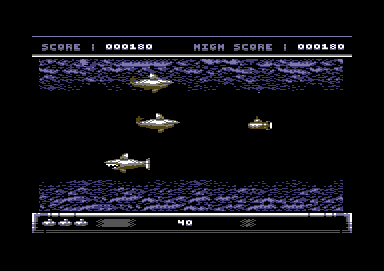
Monday
4th December 2006 - Monday night TV vs Sub Hunter
Bah! Monday night television really sucks, so I decided to work on Sub
Hunter even more (Which is more on the plus side ;o))). I worked on
with level 5, fixing some odd problems or so. Level 5's Shark Attack
stage required a few alterations, where I needed to change the last big
shark and the bullet sprites into baby sharks (As you can see below).
The small sharks swim faster, compared to the large sharks. The
difficulty level for this stage is now just about right.
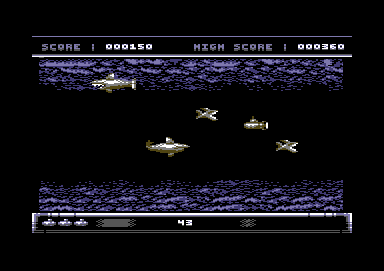
There is still one problem that I needed to deal with. One of the
layers of the bottom cave would not scroll properly after the player
push fire on the Get Ready prompt, therefore the top layer of the
bottom cave was stuck. There was a problem in the routine, so I tried
merging it inside the same routine as the last layer of cave on the
upper cave. I deleted one of the useless IRQs and hey presto, the
parallax scrolling worked out nicely. I tested the game on level 5 and
I found that it is hard to play, but it is possible to complete. Level
5 is roughly finished, so I'll send an email with the work done, over
to Frank Gasking to see what he thinks of it.
....
To be continued.