
TND Productions, C64 News + Updates

Proudly presents
DARK FORCE - DISSECTED
(REQUIRES C64STUDIO by Endurion or ACME cross-compiler)
Introduction / Setting up the enhancements / Title screen, Get Ready + Game Over / End Sequence / High Score Table
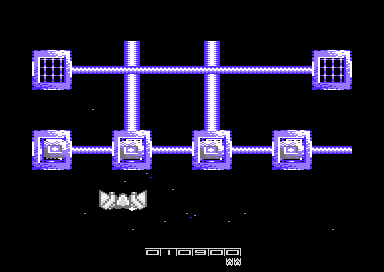

DOWNLOAD BINARIES AND SOURCE
Who
remembers the classic C64 game 'Light Force' by FTL?. It was a
stunning vertical scrolling shoot 'em up. After discovering some old
SEUCK tips in a C64 magazine in the 1990's, the SEUCK Vault and
also pushing the SEUCK limitations even further. I decided to work
during Christmas 2013 - January 2014 on a Light Force style SEUCK game
called (surprisingly) 'Dark Force. The main game was created using the
standard version of the Shoot 'Em Up Construction Kit on my Commodore
64. Alf Yngve has been really helpful setting up the graphics and the
levels. I also did some of the graphics myself. Anyway here's a bit
more about the game and what it features.
First of all, the game was saved into FINISHED GAME form directly from the shoot 'em up construction kit. This saved a standalone version of the game data. Therefore you can load up the game data from disk using the LOAD "*",8,1 prompt. However, if I were to enhance the game to push SEUCK games limitations even further. I would have needed to prepare additional graphics, music and other data.
The first thing I did was stripped the SEUCK data into 2 files, using Action Replay's machine code monitor using the command:
S "DARKF08A",8,0900,6580
S "DARKF08B",8,B6C0,FFFA
If you want to enhance a SEUCK game on its own, it is wise to save the 2 files as I did above. Since $6580-$B6C0 carries unwanted data which was left in the SEUCK.
The next job I did was prepare a new charset, and also the music. JSL did a logo for the game.
Now what about enhancing the game part?. Well, I used C64Studio by Endurion. A great C64 developing suite for the .NET framework. It also makes compiling of and compression of programs much quicker compared to native C64 format. I also needed to use VICE and EXOMIZER. I created a folder to put all of the program files in, and created a new solution, which is obviously called 'Dark_Force.s64'. Now here comes the source code.
The first source code is the main binary importing (Graphics, Bitmaps, Music, etc) and in game enhancement code, as well as some self-mode SEUCK pokes, which replaces the old title screen and game run source with new source. The enhancements include:
- Linked players and deaths
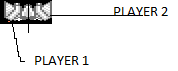
The linked players to one joystick is called by POKE 16578,2 (or LDA #$02 : STA 16578 (or $40c2 ). This will position both players on to the screen and allow both players to be moved with the aid of one joystick. This may have been an Easter Egg which was accidentally left in SEUCK for some reason. A great and handy feature this is as well.
The most important feature in this game is that PLAYER 1 and PLAYER 2 always has to be placed apart next to each other. In order to fix this, I made a simple routine which automatically flips between PLAYER / BACKGROUND CHAR collision. So that after one player is hit by an enemy, the background becomes DEADLY all the way through. The player settings then gets changed from STOP to DIE.
After the player death, and re spawn phase. The background char value gets reset to how it was originally. Then STOP is restored. The player then gets re-spawned on to the screen (linked together with the default settings as when starting a new game) and then it can be moved about once again.
- Object killed detection
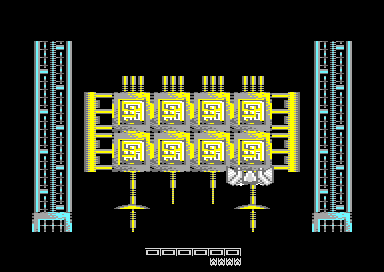
A subroutine is called in order to check which enemy has been shot. A chapter on object/enemy detection has already been mentioned in the main SEUCK school page, but somewhere in the source code, it will show you the actual object killed detection. This method was used in order to count the number of generators shot in game. Dark Force has a total of 20 generators, which much be destroyed in order to advance on to the next level. I also made it possible that for every certain amount of generators are destroyed, the player is rewarded an extra life. Then the amount to destroy (for extra lives) get reset again.
- Linked player scoring
Scoring inside a SEUCK game is usually separate to the players. However, this game uses both players linked together to form one space ship. The score panel data gets replaced with a custom share score, where both player's scores are borrowed from the scoring data, then stored as an overall score in a new area. What used to be the player's original score then gets transferred to a subroutine that displays the score panel sprites in the lower border.
- Level colour setup (according to level which is triggered)
This trick is set inside the main game loop to check whether or not the player is set on a certain level. The value of each level is based on the Level Parameters * 7. There are 22 levels in total inside the main SEUCK.
- New sound capabilities
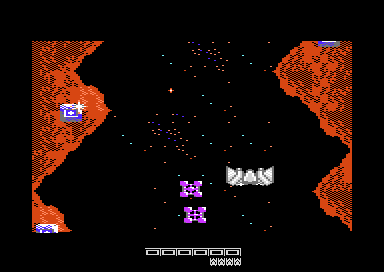
Dark Force has two different game options, they are either the standard SEUCK in game sound effects or in game music.
- In game background animation
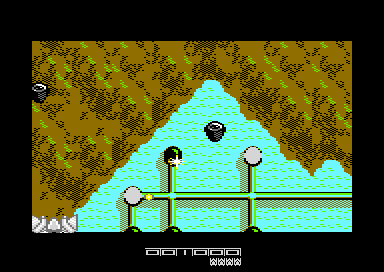
There is also in game background animation, in which scrolls some of the characters used inside the background downwards. For example the metallic voids, and the water. A charset consists of 8 bytes, and in order to call the char scroll you can push all 8 bytes of the charset left (to move them up) or right (to move them down) inside a loop. You'd need to create a temp byte to store the last byte and then after a loop, store it to the first byte - or vice-versa, depending on char scrolling direction. SEUCK's background charset data is at $F800. In order to cycle the charset
- Not used: Smart bomb effect
I also accidentally left the smart bomb effect into the source, but didn't quite use it. When Alf Yngve had created some level bosses into this game, more than one of the same boss was used later on in the game. So it wasn't worth the effort of creating the smart bomb effect. Therefore the bosses had to be blasted in segments.
- 2 endings
There are 2 endings in Dark Force. There is a subroutine which will check for the number of generators that have been destroyed (in the custom object detection subroutine). If all 20 generators have been destroyed, the subroutine will jump directly to the true ending code (mentioned in the ending source), which flashes the screen and then does a full screen explosion effect. Then jumps to the well done end message.
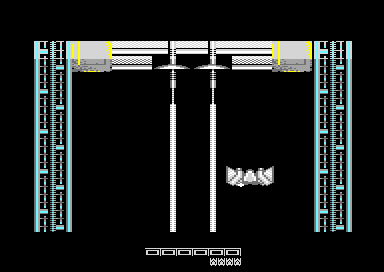
The second ending in Dark Force will scroll all the way to the very last level (Set by the player in SEUCK) where a giant laser gets fired, and then the screen explodes with a bad ending.
SETTING UP THE ENHANCEMENTS
Before we go straight on to the source code, here's a list of areas which have been used for Dark Force.
$0400-$0900 - Additional code for enhancements, one time routines (before starting the game). The area is being used to setup the new POKES in order to BYPASS the old SEUCK title screen, and be able to use the NEW title screen instead. It also sets up POKEs for other enhancement features as well. The startup code doesn't always have to be at $0400-$0900 you can easily use a DIFFERENT address if you want, but you would need to setup the De-Cruncher to execute the NEW address if you did. Otherwise $0400 is the jump address. The source code in C64Studio has already set the Exomizer (In the C:\EXOMIZERWIN32\ directory) and when assembled from the current tab. It will compress the assembled data+code together using $0400 as jump address. Therefore you can load the DARKFORCE.PRG file with VICE, CCS or port to your C64 into a disk.
$0900 - $6580 - SEUCK Map data, and main game code. Used for scoring, controlling the player, scrolling maps, etc. This area needs to remain in the source code, otherwise the program will not work, and will probably crash if left out.
$6580 - $6800 - In game enhancements code / pokes. This contains the new features in the game, including a new infinite loop (Which was originally used for playing SEUCK SFX inside a player at $4503), and also calls a few other new in game subroutines. Including background animation, possibility to play in game, music. etc...
$6800 - $7800 - Imports the title screen code, which will display a logo at the top of the screen, the credits/high score, sound options, in game music, etc. Get Ready and Game Over Music is also stored.
$7800 - $8000 - Text charset for the title screen. BANK 2 is being used to display the character set (LDA #$02 STA $DD00 : LDA #$FE STA $D018). Be aware that the title code uses $7C00 - $7FE8 for the actual screen RAM. Which means if a larger sized character set is used in that area.
$8000 - $8800 - Title screen logo Colour + Video RAM (Colour RAM at $8000, Video RAM at $8400).
$8800 - $9A00 - Music player data. Dark Force music was composed using GoatTracker and will init $8800 and play $8803. The music data consists of 5 different tracks. Which are in game, title music, get ready, game over, well done music/ hiscore music.
$9A00 - $A000 - End screen code and pointers.
$A000 - $AC00 - Logo bitmap data. Although a full screen bitmap would be $a000-$bf70, we don't have enough memory to use this, so instead the assembler should OVERWRITE the memory $b6c0 + with the last part of the SEUCK data file.
$AC00 - $B6C0 - Text data - Scroll text, title screen credits, end text, etc.
$B6C0 - $FFFA - Second half of the SEUCK game data - SFX, Sprites, Graphics and level setup data
This source is pretty much self-explained slightly. Read the ; prompt to find out what happens in the source. If you want to try out the source an build in C64Studio, click on the DISK icon to download the source.
SOURCE: DarkforceCode.asm
BACK TO TOP:
THE TITLE SCREEN
As like any other game, a title screen presentation should be created. The source code below does exactly that. When you set up your own title screen, it can be based any way you like. This front end consists of a custom character set (read from $7800-$7c00), a logo (Bitmap data at $a000, Colram at $8000, and Video RAM at $8400), some star sprites, colour bars, and other bits. All which have been put together into several routines.The title screen looks something like THIS:
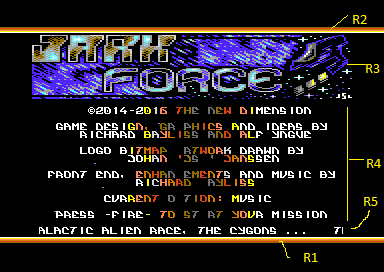
Each row (R) is setup by using a raster split, inside an IRQ interrupt. IRQ interrupts can do many amazing things, but sometimes when you try and implement your own rasters, things don't always go according to plan. This is because raster splits can misbehave quite a lot. In order to make them behave better, you can move the raster line across slightly more, using a TIMING approach. The source code below gives an example of timing rasters. Adding NOPs or some fake codes can time those blighters out. Anyway, let's describe about the Rasters used.
If using the multiple interrupt routine, although I set a raster in the first IRQ as the value of R2, the settings need to updated to values of R1. Basically the position of R1 ends where R2 starts. We have to setup the hardware values after the previous raster. Then set the low/hi-bytes of the next IRQ interrupt into the interrupt flag. This might not make much sense here, but the code below will show you how it is done.
R1 represents the colour bar at the bottom and ends at raster line R2
R2 represents the colour bar at the top and ends at raster line R3
R3 represents the logo and ends at raster line R4
R4 represents the presentation text, and ends at raster line R5
R5 represents the scroll text code and ends at raster line R1
The main title screen outside the multiple IRQ willl call subroutines to wash colours, and scroll text, flip pages, etc. The source code already tells you what everything does.
Get Ready and Game Over is also linked to the Title Screen Source.
Anyway here's the source:
The main title code:
SOURCE: frontend.asm
BACK TO TOP:
THE GAME ENDING
The game ending uses a single IRQ interrupt, which will do nothing special, apart from display the end text and play music. Before all this is kicked in, a count of the generators is detected and will flash the screen multicolours - IF in the game all generator sprites have been destroyed. Otherwise the explosion effect is triggered and then jumps straight on to the bad ending.
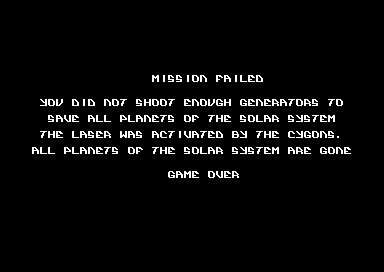
Source for game ending:
SOURCE: endcode.asm
BACK TO TOP:
THE HIGH SCORE / NAME ENTRY
The listing below will check for the player's current score (via pointers) and see whether or not the 3 hi-scores are actually LOWER than the player's final score. If it is, another routine gets called to allow the player to enter his/her name in to the high score table. Otherwise the hi-score detection will display 'NOT A HIGH SCORE', and prompts the player to press fire to return to the front end.
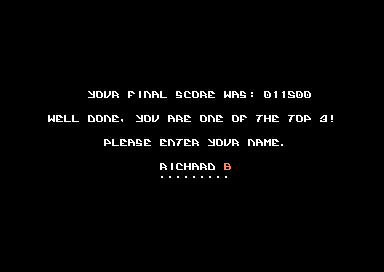
The name entry routine is called inside another Sync loop, where moving the joystick up / down will advance or go back a letter. A subroutine is also called to check whether the letter value is too high or too low and will reset the letter to the lowest or highest. Up Arrow and Left Arrow are set as the End and Delete chars. When either of the two arrows are spotted at the press of the FIRE BUTTON. A routine will either delete the arrow char and delete the char before it, or the routine will REMOVE the UP arrow, and copy the player's final score and name to one of the top 3 hi-scores. Then jumps straight back to the title screen. The chosen letter flashes to indicate the position of the cursor for the player to enter its name.
Finally the hi-score routine / name entry routine:
SOURCE: hiscore.asm
So there you go. Dark Force - The full source code.
BACK TO TOP:
First of all, the game was saved into FINISHED GAME form directly from the shoot 'em up construction kit. This saved a standalone version of the game data. Therefore you can load up the game data from disk using the LOAD "*",8,1 prompt. However, if I were to enhance the game to push SEUCK games limitations even further. I would have needed to prepare additional graphics, music and other data.
The first thing I did was stripped the SEUCK data into 2 files, using Action Replay's machine code monitor using the command:
S "DARKF08A",8,0900,6580
S "DARKF08B",8,B6C0,FFFA
If you want to enhance a SEUCK game on its own, it is wise to save the 2 files as I did above. Since $6580-$B6C0 carries unwanted data which was left in the SEUCK.
The next job I did was prepare a new charset, and also the music. JSL did a logo for the game.
Now what about enhancing the game part?. Well, I used C64Studio by Endurion. A great C64 developing suite for the .NET framework. It also makes compiling of and compression of programs much quicker compared to native C64 format. I also needed to use VICE and EXOMIZER. I created a folder to put all of the program files in, and created a new solution, which is obviously called 'Dark_Force.s64'. Now here comes the source code.
The first source code is the main binary importing (Graphics, Bitmaps, Music, etc) and in game enhancement code, as well as some self-mode SEUCK pokes, which replaces the old title screen and game run source with new source. The enhancements include:
- Linked players and deaths
The linked players to one joystick is called by POKE 16578,2 (or LDA #$02 : STA 16578 (or $40c2 ). This will position both players on to the screen and allow both players to be moved with the aid of one joystick. This may have been an Easter Egg which was accidentally left in SEUCK for some reason. A great and handy feature this is as well.
The most important feature in this game is that PLAYER 1 and PLAYER 2 always has to be placed apart next to each other. In order to fix this, I made a simple routine which automatically flips between PLAYER / BACKGROUND CHAR collision. So that after one player is hit by an enemy, the background becomes DEADLY all the way through. The player settings then gets changed from STOP to DIE.
After the player death, and re spawn phase. The background char value gets reset to how it was originally. Then STOP is restored. The player then gets re-spawned on to the screen (linked together with the default settings as when starting a new game) and then it can be moved about once again.
- Object killed detection
A subroutine is called in order to check which enemy has been shot. A chapter on object/enemy detection has already been mentioned in the main SEUCK school page, but somewhere in the source code, it will show you the actual object killed detection. This method was used in order to count the number of generators shot in game. Dark Force has a total of 20 generators, which much be destroyed in order to advance on to the next level. I also made it possible that for every certain amount of generators are destroyed, the player is rewarded an extra life. Then the amount to destroy (for extra lives) get reset again.
- Linked player scoring
Scoring inside a SEUCK game is usually separate to the players. However, this game uses both players linked together to form one space ship. The score panel data gets replaced with a custom share score, where both player's scores are borrowed from the scoring data, then stored as an overall score in a new area. What used to be the player's original score then gets transferred to a subroutine that displays the score panel sprites in the lower border.
- Level colour setup (according to level which is triggered)
This trick is set inside the main game loop to check whether or not the player is set on a certain level. The value of each level is based on the Level Parameters * 7. There are 22 levels in total inside the main SEUCK.
- New sound capabilities
Dark Force has two different game options, they are either the standard SEUCK in game sound effects or in game music.
- In game background animation
There is also in game background animation, in which scrolls some of the characters used inside the background downwards. For example the metallic voids, and the water. A charset consists of 8 bytes, and in order to call the char scroll you can push all 8 bytes of the charset left (to move them up) or right (to move them down) inside a loop. You'd need to create a temp byte to store the last byte and then after a loop, store it to the first byte - or vice-versa, depending on char scrolling direction. SEUCK's background charset data is at $F800. In order to cycle the charset
- Not used: Smart bomb effect
I also accidentally left the smart bomb effect into the source, but didn't quite use it. When Alf Yngve had created some level bosses into this game, more than one of the same boss was used later on in the game. So it wasn't worth the effort of creating the smart bomb effect. Therefore the bosses had to be blasted in segments.
- 2 endings
There are 2 endings in Dark Force. There is a subroutine which will check for the number of generators that have been destroyed (in the custom object detection subroutine). If all 20 generators have been destroyed, the subroutine will jump directly to the true ending code (mentioned in the ending source), which flashes the screen and then does a full screen explosion effect. Then jumps to the well done end message.
The second ending in Dark Force will scroll all the way to the very last level (Set by the player in SEUCK) where a giant laser gets fired, and then the screen explodes with a bad ending.
SETTING UP THE ENHANCEMENTS
Before we go straight on to the source code, here's a list of areas which have been used for Dark Force.
$0400-$0900 - Additional code for enhancements, one time routines (before starting the game). The area is being used to setup the new POKES in order to BYPASS the old SEUCK title screen, and be able to use the NEW title screen instead. It also sets up POKEs for other enhancement features as well. The startup code doesn't always have to be at $0400-$0900 you can easily use a DIFFERENT address if you want, but you would need to setup the De-Cruncher to execute the NEW address if you did. Otherwise $0400 is the jump address. The source code in C64Studio has already set the Exomizer (In the C:\EXOMIZERWIN32\ directory) and when assembled from the current tab. It will compress the assembled data+code together using $0400 as jump address. Therefore you can load the DARKFORCE.PRG file with VICE, CCS or port to your C64 into a disk.
$0900 - $6580 - SEUCK Map data, and main game code. Used for scoring, controlling the player, scrolling maps, etc. This area needs to remain in the source code, otherwise the program will not work, and will probably crash if left out.
$6580 - $6800 - In game enhancements code / pokes. This contains the new features in the game, including a new infinite loop (Which was originally used for playing SEUCK SFX inside a player at $4503), and also calls a few other new in game subroutines. Including background animation, possibility to play in game, music. etc...
$6800 - $7800 - Imports the title screen code, which will display a logo at the top of the screen, the credits/high score, sound options, in game music, etc. Get Ready and Game Over Music is also stored.
$7800 - $8000 - Text charset for the title screen. BANK 2 is being used to display the character set (LDA #$02 STA $DD00 : LDA #$FE STA $D018). Be aware that the title code uses $7C00 - $7FE8 for the actual screen RAM. Which means if a larger sized character set is used in that area.
$8000 - $8800 - Title screen logo Colour + Video RAM (Colour RAM at $8000, Video RAM at $8400).
$8800 - $9A00 - Music player data. Dark Force music was composed using GoatTracker and will init $8800 and play $8803. The music data consists of 5 different tracks. Which are in game, title music, get ready, game over, well done music/ hiscore music.
$9A00 - $A000 - End screen code and pointers.
$A000 - $AC00 - Logo bitmap data. Although a full screen bitmap would be $a000-$bf70, we don't have enough memory to use this, so instead the assembler should OVERWRITE the memory $b6c0 + with the last part of the SEUCK data file.
$AC00 - $B6C0 - Text data - Scroll text, title screen credits, end text, etc.
$B6C0 - $FFFA - Second half of the SEUCK game data - SFX, Sprites, Graphics and level setup data
This source is pretty much self-explained slightly. Read the ; prompt to find out what happens in the source. If you want to try out the source an build in C64Studio, click on the DISK icon to download the source.
SOURCE: DarkforceCode.asm
|
BACK TO TOP:
THE TITLE SCREEN
As like any other game, a title screen presentation should be created. The source code below does exactly that. When you set up your own title screen, it can be based any way you like. This front end consists of a custom character set (read from $7800-$7c00), a logo (Bitmap data at $a000, Colram at $8000, and Video RAM at $8400), some star sprites, colour bars, and other bits. All which have been put together into several routines.The title screen looks something like THIS:
Each row (R) is setup by using a raster split, inside an IRQ interrupt. IRQ interrupts can do many amazing things, but sometimes when you try and implement your own rasters, things don't always go according to plan. This is because raster splits can misbehave quite a lot. In order to make them behave better, you can move the raster line across slightly more, using a TIMING approach. The source code below gives an example of timing rasters. Adding NOPs or some fake codes can time those blighters out. Anyway, let's describe about the Rasters used.
If using the multiple interrupt routine, although I set a raster in the first IRQ as the value of R2, the settings need to updated to values of R1. Basically the position of R1 ends where R2 starts. We have to setup the hardware values after the previous raster. Then set the low/hi-bytes of the next IRQ interrupt into the interrupt flag. This might not make much sense here, but the code below will show you how it is done.
R1 represents the colour bar at the bottom and ends at raster line R2
R2 represents the colour bar at the top and ends at raster line R3
R3 represents the logo and ends at raster line R4
R4 represents the presentation text, and ends at raster line R5
R5 represents the scroll text code and ends at raster line R1
The main title screen outside the multiple IRQ willl call subroutines to wash colours, and scroll text, flip pages, etc. The source code already tells you what everything does.
Get Ready and Game Over is also linked to the Title Screen Source.
Anyway here's the source:
The main title code:
SOURCE: frontend.asm
RasterLine1 = $00 ;Position of raster line 1 |
BACK TO TOP:
THE GAME ENDING
The game ending uses a single IRQ interrupt, which will do nothing special, apart from display the end text and play music. Before all this is kicked in, a count of the generators is detected and will flash the screen multicolours - IF in the game all generator sprites have been destroyed. Otherwise the explosion effect is triggered and then jumps straight on to the bad ending.
Source for game ending:
SOURCE: endcode.asm
;Dark Force happy ending - Flash the game screen ($d022, $d023). |
BACK TO TOP:
THE HIGH SCORE / NAME ENTRY
The listing below will check for the player's current score (via pointers) and see whether or not the 3 hi-scores are actually LOWER than the player's final score. If it is, another routine gets called to allow the player to enter his/her name in to the high score table. Otherwise the hi-score detection will display 'NOT A HIGH SCORE', and prompts the player to press fire to return to the front end.
The name entry routine is called inside another Sync loop, where moving the joystick up / down will advance or go back a letter. A subroutine is also called to check whether the letter value is too high or too low and will reset the letter to the lowest or highest. Up Arrow and Left Arrow are set as the End and Delete chars. When either of the two arrows are spotted at the press of the FIRE BUTTON. A routine will either delete the arrow char and delete the char before it, or the routine will REMOVE the UP arrow, and copy the player's final score and name to one of the top 3 hi-scores. Then jumps straight back to the title screen. The chosen letter flashes to indicate the position of the cursor for the player to enter its name.
Finally the hi-score routine / name entry routine:
SOURCE: hiscore.asm
;Hi score check routine. |
So there you go. Dark Force - The full source code.
BACK TO TOP: